

MetLifeNew User Registration
Branding / UI/UX Design
Project Impact
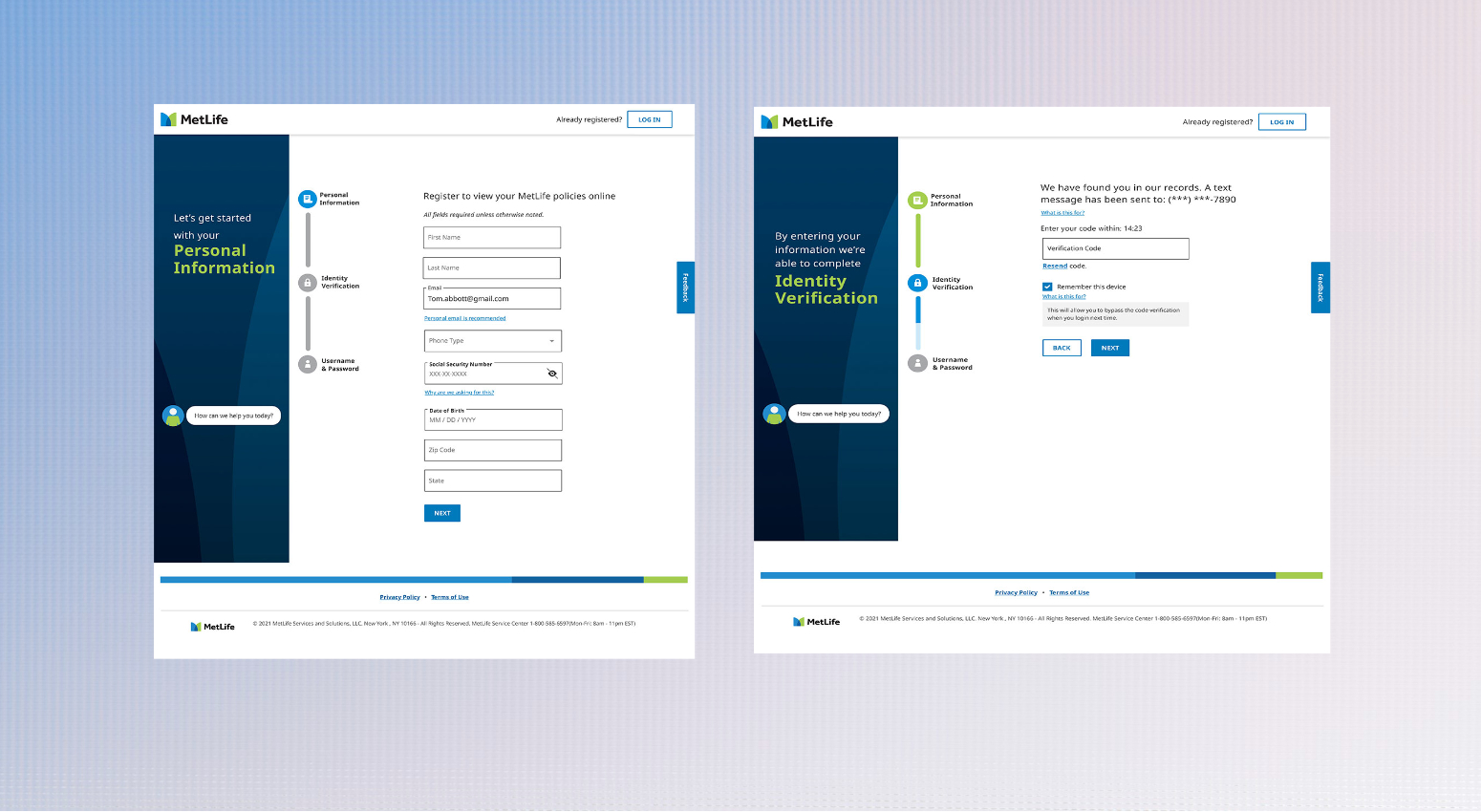
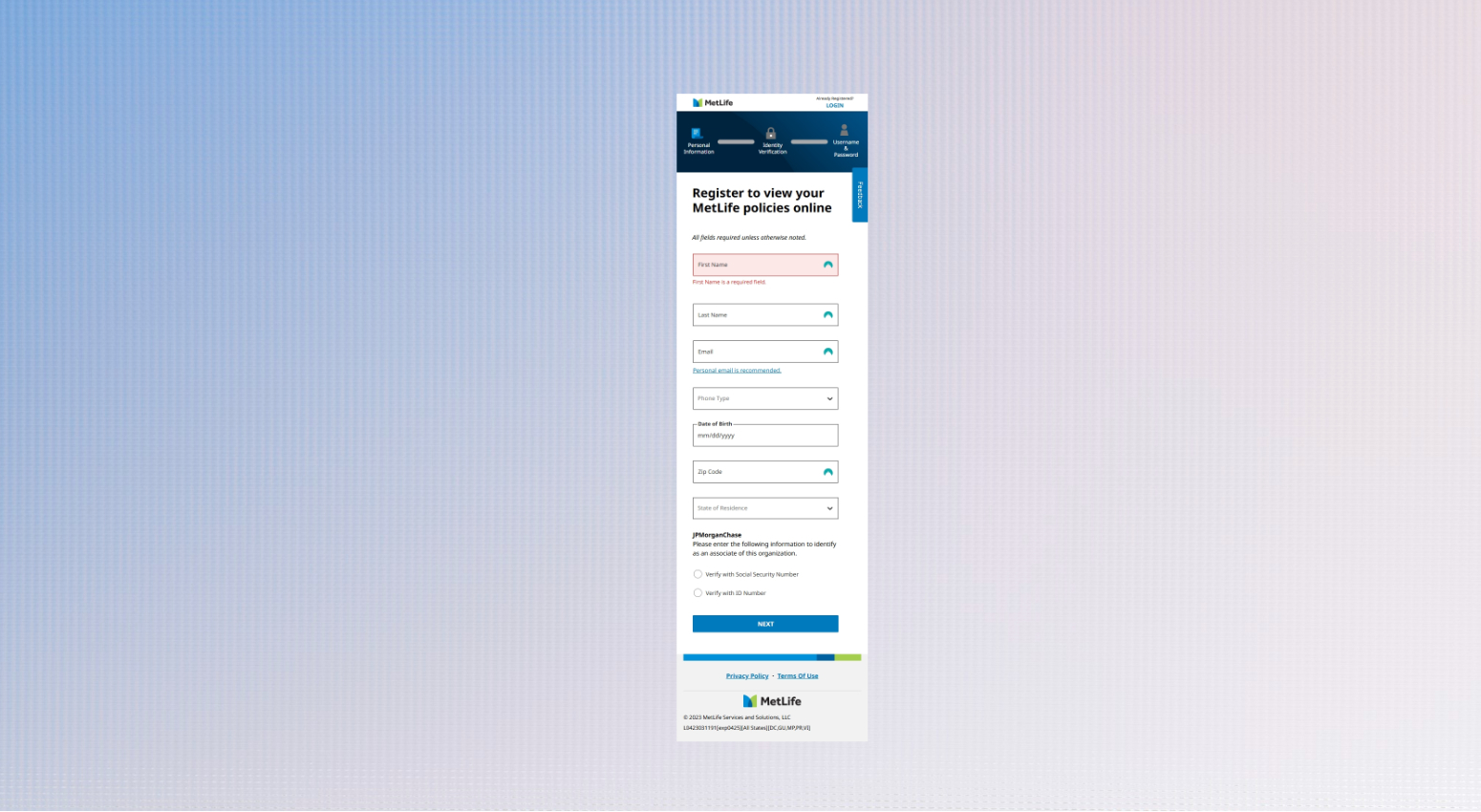
The impact of the MetLife Registration project was a 80% reduction in user drop-offs, leading to smoother onboarding, higher completion rates, and a better overall user experience for employees enrolling in benefits.
Project Details
Client:
MetLife
Services:
Re-design, UX/UI Design, Branding
Project Timeline:
4-5 months
Tools & Method:
Figma, A/B Testing, Usability Testing, SUS Score, Stakeholder Review
Documents:
Project Description
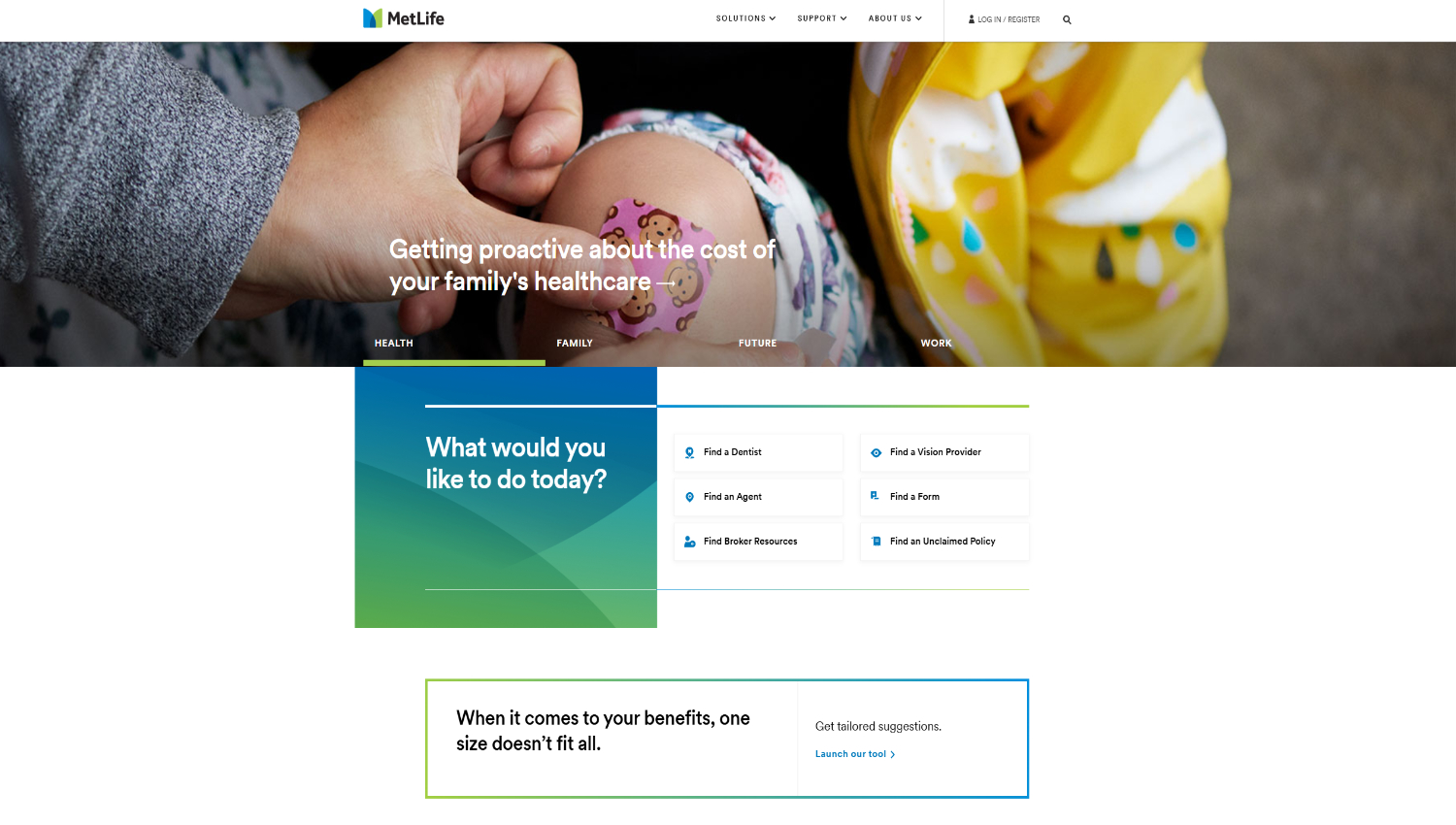
When John, a new employee at a Fortune 500 company, tried to access his MetLife benefits, what should have been a simple registration became a 20-minute struggle. He, like many others, couldn’t easily locate the registration portal on MetLife’s homepage. This case was not unique—it reflected a broader usability issue.
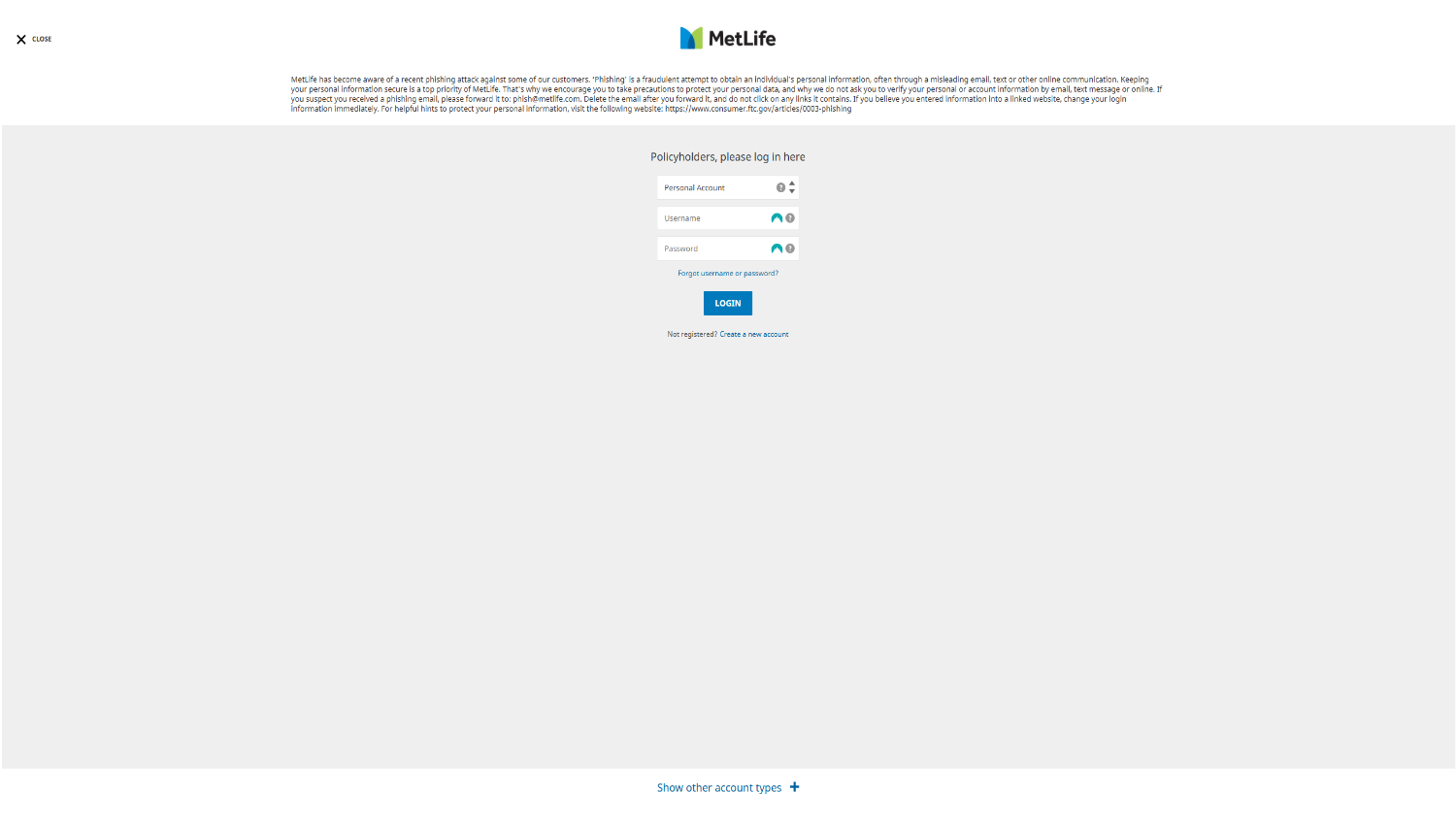
This project focused on redesigning the registration experience, starting from the overlay triggered after clicking the "Login" link on the homepage. While the homepage was owned by the global team and out of scope, I made UX suggestions (such as separate CTAs for Login and Register), though they were not adopted.
The Challenge
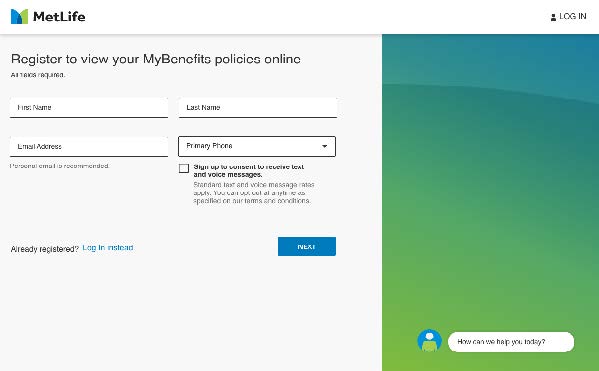
MetLife’s existing login overlay combined login and registration under a single link, leading to:
-
Poor findability of the registration entry point.
-
A lengthy, unintuitive registration experience.
-
High user drop-off rates during the process.
The primary goals of the redesign were:
-
Make the registration entry point easier to find.
-
Streamline the registration process for quicker completion.
-
Reduce drop-offs and improve the onboarding experience for new users.


My Role
As the UX Designer, I led the research and design for the overlay experience and the registration flow. Responsibilities included:
-
Conducting usability testing and A/B testing.
-
Creating wireframes and interactive prototypes.
-
Collaborating with cross-functional teams to evaluate feasibility.
-
Measuring success through SUS (System Usability Scale) scoring and stakeholder feedback.
The Process
| Phase | Activities | Outputs |
|---|---|---|
| Discovery & Audit | Reviewed the existing overlay & flow, mapped pain points. | UX audit, workflow diagram, heuristics report |
| User Research | Conducted usability tests and collected feedback from new users like John. | Key pain points: findability, unclear CTA |
| Ideation | Created multiple wireframes to address entry point clarity and flow simplification. | Annotated wireframes, prototype variations |
| A/B Testing | Designed and tested 3 registration flows (1 by me, 2 by others). | Analytics report on click-throughs and drop-offs |
| SUS Evaluation | Used SUS to measure usability of each version quantitatively. | Comparative SUS scores, informed design selection |
| Design Finalization | Implemented feedback, refined the winning prototype. | Hi-fidelity mockups in Figma, handoff documentation |
| Post-launch Review | Assessed usage post-launch via user feedback and usage data. | Positive user reception from MetLife clients and users |

Key UX Strategies
✅ Usability Testing
-
Identified the homepage CTA confusion as the root issue.
-
Solution: Proposed adding a distinct Register button visible from the login overlay and homepage (suggestion made but not implemented on homepage).
✅ A/B Testing
-
Created 3 different flows:
-
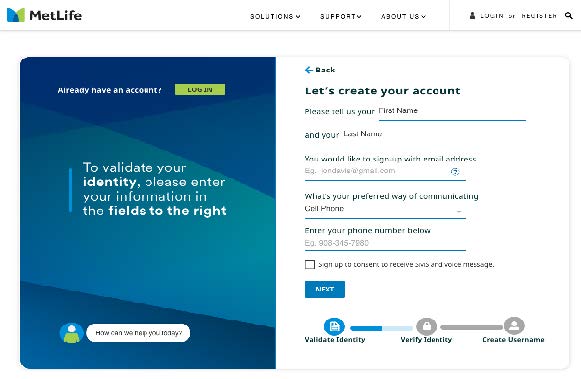
Option A (mine): Separate, guided registration steps with clear progress markers.
-
Options B & C: Variations designed by other team members.
-
-
Outcome: My design (C) won based on task completion time, user satisfaction, and drop-off reduction.
✅ SUS Scoring
-
Measured perceived usability of each version using a System Usability Scale.
-
My design scored highest, confirming both user ease and comprehension.
Design Improvements
Before:
-
One generic “Login” link led to confusion.
-
Combined Login/Registration interface created cognitive friction.
-
Lengthy registration flow with unclear progress indicators.
After:
-
Clear Register Now CTA introduced within overlay.
-
Simplified step-by-step registration flow with progress visibility.
-
Content and layout aligned to MetLife brand guidelines and accessibility standards.
Reflection
This project emphasized the importance of advocating for the user even when you're constrained by platform ownership (e.g., homepage managed by another team). Through a data-driven, iterative UX process, I was able to improve a core user experience and impact real business outcomes, reducing drop-offs and increasing user satisfaction.
