
DHS (NYC)Dashboard & Forms Project
Branding / UI/UX Design

Project Details
Client:
Department of Homeless Services, NYC
Services:
Re-design, UX/UI Design, Branding
Project Timeline:
1+ year
Overview
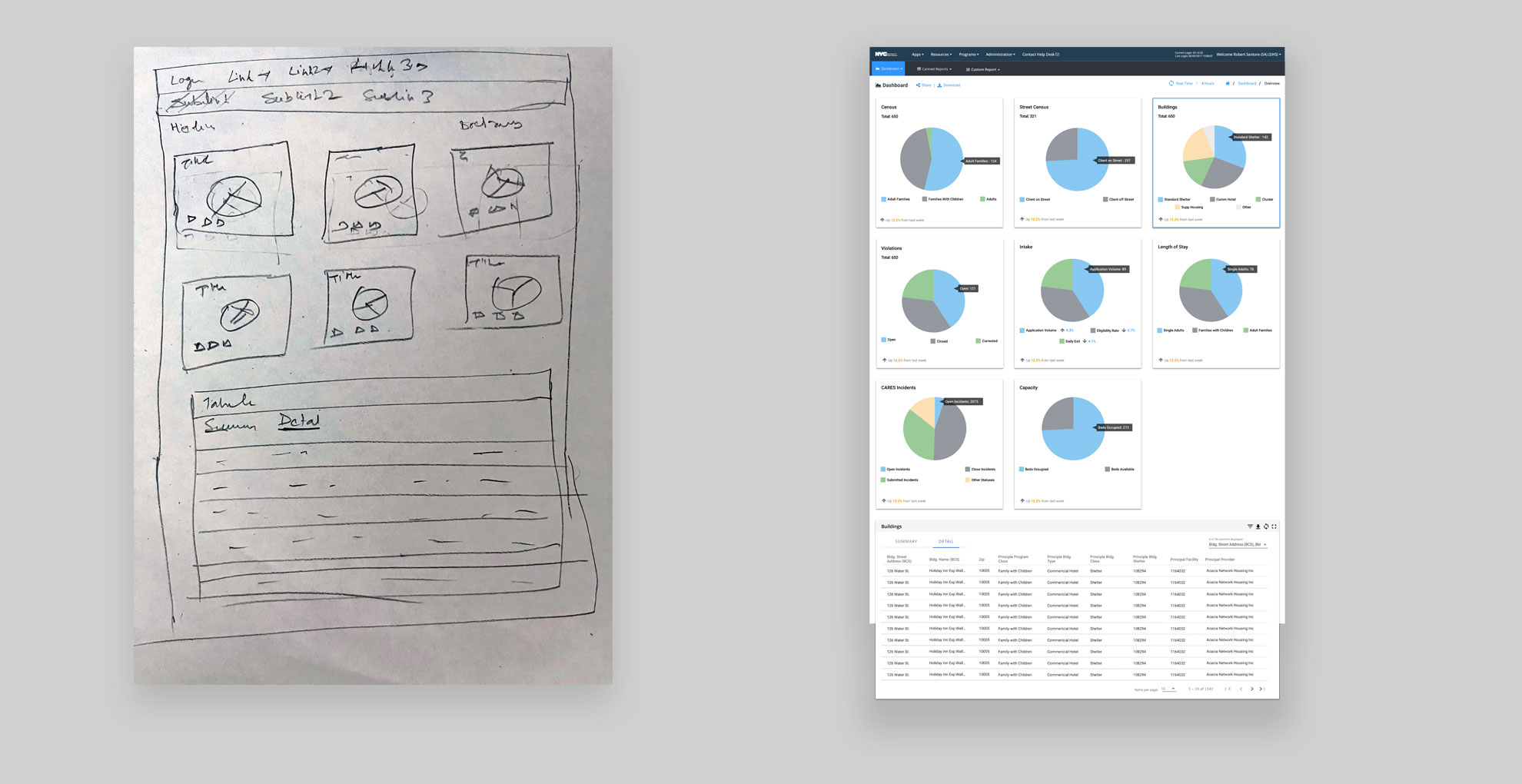
The NYC Department of Homeless Services operates shelters across the five boroughs to assist individuals and families experiencing homelessness. Staff and applicants rely on internal web-based applications to manage and access information related to shelters, applications, case statuses, and resource distribution. These tools primarily use data tables, graphs, and multi-step forms for input and review.
The Challenge
-
No direct access to users: There were no opportunities to interview or test with actual end users due to logistical and policy restrictions.
-
Secondhand requirements: All UX input came through Business Analysts (BAs), who themselves had limited contact with the user base.
-
Rigid development constraints: Developers had an existing design system built on Angular Material components, and required all designs to conform strictly to this system.
-
Legacy systems: Existing applications, developed in 2018–2019, had outdated interfaces and needed UX modernization without full redesign freedom.
The Role
As the sole UX Designer, I was responsible for:
-
Understanding and interpreting secondhand user needs via BA collaboration.
-
Designing flows, wireframes, and component-aligned interfaces for both legacy and new applications.
-
Advocating for improved UX within strict design system and technology constraints.
-
Presenting design solutions iteratively to BAs and developers for validation.
UX Process
Below is a summary of my design process, which adapted to the constraints of limited user access and a fixed component library.
| Phase | Activities | Tools/Methods | Outputs |
|---|---|---|---|
| 1. Requirement Analysis | Met with BAs to review specs, clarify scenarios, and list potential use cases | Requirement walkthroughs, note-taking | High-level user stories and business logic mapping |
| 2. Flow Mapping | Sketched paper flows to understand process steps and screen coverage | Paper sketches, whiteboard sessions | Screen matrix and interaction flow diagrams |
| 3. Wireframe Design | Created low-fidelity wireframes aligned to Angular Material library | Sketch | Click-through wireframes shared with BAs and dev team |
| 4. Component Alignment | Mapped each interface element to a reusable Angular Material component | Developer design system documentation | Dev-ready UI with consistent, reusable components |
| 5. Feedback & Iteration | Weekly design reviews with dev and BA team to refine solutions | Review sessions, comments via PDF/Sketch | Updated wireframes, alternate interaction proposals |
| 6. Handoff & Support | Provided assets and clarification to developers during implementation | Slack, meetings, annotated PDFs | Finalized designs, assets, and design rationale notes |
Key UX Contribution
-
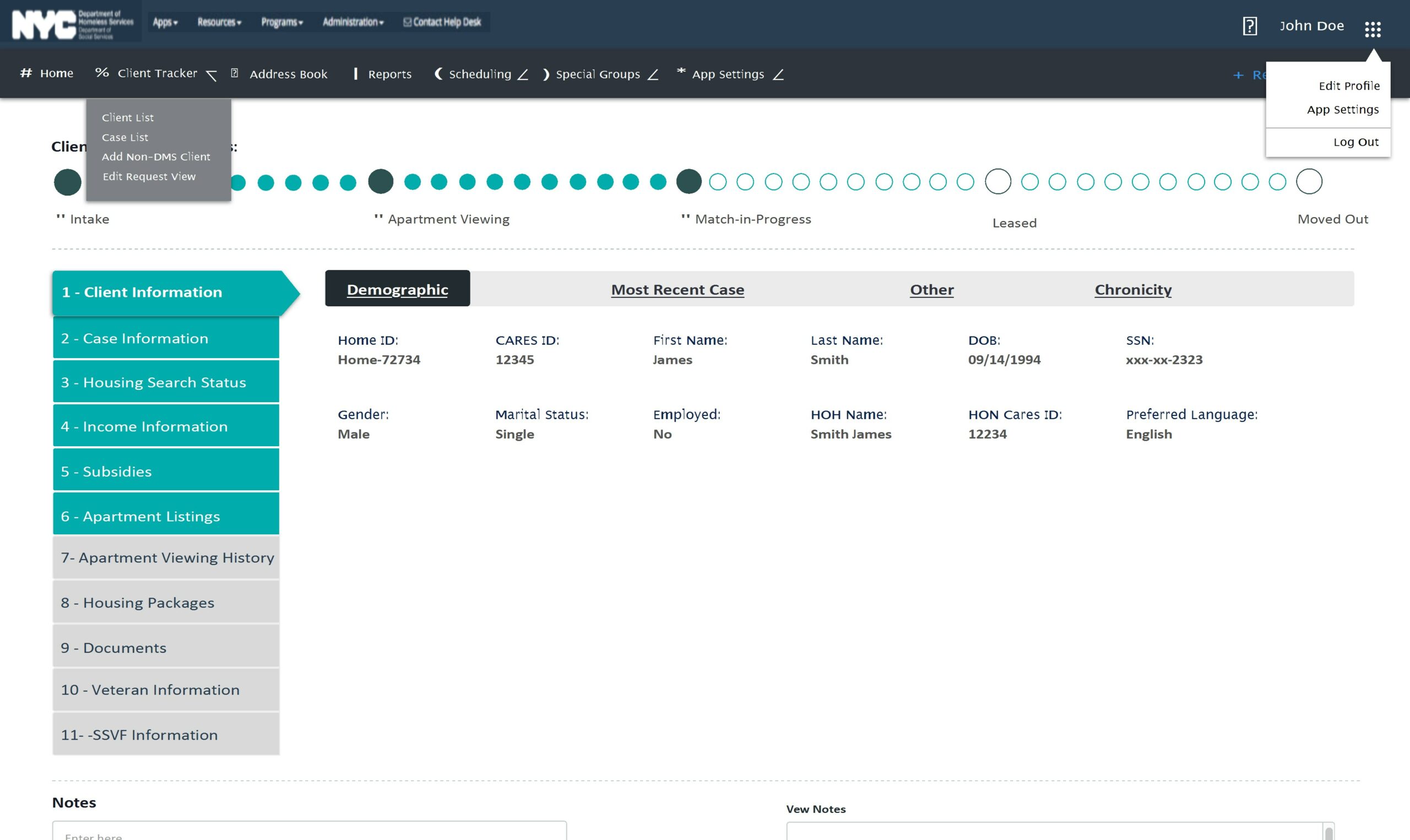
Improved Multi-Step Forms: Simplified long forms using chunked sections with clear navigation, inline validation, and contextual help.
-
Data Table Enhancements: Introduced filtering, sorting, and column prioritization to make tabular data more actionable.
-
Error Prevention Patterns: Added confirmations and in-line messaging to reduce user input errors.
-
Component-Driven Design: Balanced user needs with dev limitations by working closely within the Angular Material system.
The Outcome
-
Several legacy applications received UX updates that modernized their interfaces without disrupting backend structures.
-
New applications designed during this period continued development through September 2019.
-
Despite not having direct access to users, BA feedback indicated improved clarity and usability in flows and interfaces.
-
The iterative, developer-aligned design process reduced rework and ensured efficient handoff within Agile cycles.
Reflection
This project challenged me to work creatively within constraints—balancing user empathy with indirect insights, and flexibility with strict design systems. By collaborating deeply with BAs and developers, I was able to deliver usable, accessible, and maintainable designs that improved outcomes for both staff and applicants across NYC's shelter system.
The Challenge
-
No direct access to users: There were no opportunities to interview or test with actual end users due to logistical and policy restrictions.
-
Secondhand requirements: All UX input came through Business Analysts (BAs), who themselves had limited contact with the user base.
-
Rigid development constraints: Developers had an existing design system built on Angular Material components, and required all designs to conform strictly to this system.
-
Legacy systems: Existing applications, developed in 2018–2019, had outdated interfaces and needed UX modernization without full redesign freedom.
The Role
As the sole UX Designer, I was responsible for:
-
Understanding and interpreting secondhand user needs via BA collaboration.
-
Designing flows, wireframes, and component-aligned interfaces for both legacy and new applications.
-
Advocating for improved UX within strict design system and technology constraints.
-
Presenting design solutions iteratively to BAs and developers for validation.
UX Process
Below is a summary of my design process, which adapted to the constraints of limited user access and a fixed component library.
| Phase | Activities | Tools/Methods | Outputs |
|---|---|---|---|
| 1. Requirement Analysis | Met with BAs to review specs, clarify scenarios, and list potential use cases | Requirement walkthroughs, note-taking | High-level user stories and business logic mapping |
| 2. Flow Mapping | Sketched paper flows to understand process steps and screen coverage | Paper sketches, whiteboard sessions | Screen matrix and interaction flow diagrams |
| 3. Wireframe Design | Created low-fidelity wireframes aligned to Angular Material library | Sketch | Click-through wireframes shared with BAs and dev team |
| 4. Component Alignment | Mapped each interface element to a reusable Angular Material component | Developer design system documentation | Dev-ready UI with consistent, reusable components |
| 5. Feedback & Iteration | Weekly design reviews with dev and BA team to refine solutions | Review sessions, comments via PDF/Sketch | Updated wireframes, alternate interaction proposals |
| 6. Handoff & Support | Provided assets and clarification to developers during implementation | Slack, meetings, annotated PDFs | Finalized designs, assets, and design rationale notes |
Key UX Contribution
-
Improved Multi-Step Forms: Simplified long forms using chunked sections with clear navigation, inline validation, and contextual help.
-
Data Table Enhancements: Introduced filtering, sorting, and column prioritization to make tabular data more actionable.
-
Error Prevention Patterns: Added confirmations and in-line messaging to reduce user input errors.
-
Component-Driven Design: Balanced user needs with dev limitations by working closely within the Angular Material system.
The Outcome
-
Several legacy applications received UX updates that modernized their interfaces without disrupting backend structures.
-
New applications designed during this period continued development through September 2019.
-
Despite not having direct access to users, BA feedback indicated improved clarity and usability in flows and interfaces.
-
The iterative, developer-aligned design process reduced rework and ensured efficient handoff within Agile cycles.
Reflection
This project challenged me to work creatively within constraints—balancing user empathy with indirect insights, and flexibility with strict design systems. By collaborating deeply with BAs and developers, I was able to deliver usable, accessible, and maintainable designs that improved outcomes for both staff and applicants across NYC's shelter system.
